Read this first: three kinds of tool
Mixing these up is the most expensive mistake in AI book writing. Know which kind you are buying before you pay.

| Kind | What it does | Examples |
|---|---|---|
| General AI writers | Generate excellent text but make no books, leaving structuring, formatting and export to you | Claude, ChatGPT |
| Fiction craft tools | Built for novels, tracking characters and canon and writing at the scene level, but mostly not publishing | Sudowrite, Novelcrafter |
| End-to-end generators | Run the whole chain from outline to cover to EPUB, trading prose control for a finished file | Inkfluence AI, Chapter |
Pick your stack
Each stack lists the tool for every stage. Costs mix one-time, subscription and pay-as-you-go, so they are shown honestly rather than as a single number.

The craft-first fiction stack
PLAN Novelcrafter Codex for characters and continuity
DRAFT Sudowrite for scene-level prose
EDIT Claude for voice-preserving revision
FORMAT Atticus for print and ebook files
Roughly $10 to $30 a month for AI, plus $147 once for Atticus | Best if you write fiction and care about prose and continuity

The nonfiction ebook stack
PLAN ChatGPT for outlines and chapter breakdowns
DRAFT ChatGPT or Claude for chapter drafts
EDIT Claude for structure and clarity
FORMAT Atticus for a KDP-ready file
About $20 a month for AI, plus $147 once for Atticus | Best if you write guides or how-to and want the structure controlled

The fastest path to published
ALL-IN-ONE An end-to-end generator such as Inkfluence AI
COVERS Outline, chapters and cover in one pass
EXPORTS EPUB and PDF, some add audiobook
YOU DO Guide the idea, then edit the output
Free to about $20 a month, one tool | Best if you never finish a draft and can accept less prose control

The free stack
PLAN ChatGPT or Claude free tier
DRAFT Same free tier, chapter by chapter
EDIT Same free tier, one chapter at a time
FORMAT Reedsy Studio or Kindle Create, both free
$0, enough to draft and format a real book | Best if you are testing the idea or working with no budget
The tool library
What each option is, how it works and exactly what it does and does not do.
Claude - General AI writer
Claude is a general-purpose AI assistant rather than a book app, and its value to authors sits in two places: drafting longer passages and, above all, editing. It holds context and tone across long stretches of text, so it can take a full chapter and return a structural critique, a pacing pass or a line edit without losing the thread of what came before.
In practice authors run it in passes. A first prompt asks for a diagnostic read, where the pacing sags, which beats repeat, where a character slips out of voice. A second asks it to rewrite specific passages, and it holds your style noticeably better when you paste in a sample of your own prose and tell it what to preserve. Because it works only from what you give it, the quality of the brief matters as much as the model.
What it will not do is make a book. There is no chapter manager, no formatting engine and no export, so Claude lives at the drafting and editing stages and hands off to a craft tool or a formatter for everything downstream. It is available on the web and as desktop and mobile apps, with a capable free tier and a paid plan around twenty dollars a month.
| Type | General AI writer | Access | Web, desktop and mobile apps |
| Pricing | Free tier, or about $20 per month | Exports | None, you copy text into a writing or formatting tool |
| Best at | Voice-preserving editing and nuanced long-form | Limit | No formatting, cover or export of its own |
ChatGPT - General AI writer
ChatGPT is the flexible generalist of the early stages. It is quick at pressure-testing a premise, turning a rough idea into a nonfiction outline with chapter and section headings, and producing first-draft paragraphs you can react to. Its free tier is the most capable no-cost way to try AI writing, which is why many authors start here before deciding whether a specialist tool is worth paying for.
The catch for book-length work is friction. It has no chapter management, so you keep the structure in a separate document and paste sections back and forth, and the free tier has usage limits that cap how much you can generate in a sitting, which slows a long manuscript. Custom instructions help it hold a more consistent style across a project, but you remain the one keeping the whole book organized.
Like Claude, it produces text and nothing else: no formatting, no cover, no export to EPUB or print PDF. Treat it as an ideation and drafting partner at the front of your workflow, paired with a formatter at the end. It runs on the web and as desktop and mobile apps, free or around twenty dollars a month for the paid tier.
| Type | General AI writer | Access | Web, desktop and mobile apps |
| Pricing | Free tier, or about $20 per month | Exports | None, manual copy and paste |
| Best at | Brainstorming, outlines and fast drafting | Limit | All chapter and format work falls on you |
Sudowrite - Fiction craft tool
Sudowrite is the most purpose-built tool on this list for writing fiction, and every feature is shaped around prose rather than chat. Its Story Engine walks a novel from outline to draft, its Story Bible tracks characters and canon so the AI stays consistent across chapters, and its fiction-trained models are tuned for narrative rather than general text.
The day-to-day work happens through scene-level tools that sit inside your draft. Describe expands a moment into sensory detail, Rewrite offers style variations of a passage, Expand continues from where you stopped, and Brainstorm throws out options when you are stuck. All tiers unlock the same tools and differ only by how many credits you receive, and unused credits roll over for twelve months, though premium models spend them noticeably faster than budget ones.
Its limits are deliberate. Sudowrite does not export a formatted file, design a cover, or offer nonfiction templates, so it is a drafting and revision tool that you pair with a formatter to publish. Pricing runs from about ten dollars a month annually on the Hobby tier up to the Max tier, and it has an active community of fiction writers sharing prompts and workflows.
| Type | Fiction craft tool | Access | Web |
| Pricing | About $10 to $44 per month annually, credit-based | AI | Bundled fiction-trained models |
| Best at | Scene-level fiction prose and rewriting | Limit | No export, cover or nonfiction templates |
Novelcrafter - Fiction craft tool
Novelcrafter is a web-based platform used by more than 157,000 authors that behaves as a writing system first and an AI add-on second. Its centerpiece is the Codex, a linked story bible for characters, locations, lore and other recurring entities, with support for series and shared universes, which keeps continuity beside the manuscript instead of scattered across notes.
AI runs on a bring-your-own-key model: you connect your own provider, such as OpenRouter, OpenAI or Anthropic, or a local model, and pay that provider per token. From the AI tier up you get scene-beat generation, character extraction, summarization and a Workshop Chat for brainstorming and worldbuilding, plus custom Blueprints that steer writing style and structure. The plan ladder runs Scribe at four dollars for writing and the Codex with no AI, Hobbyist at eight dollars where bring-your-own-key AI begins, Artisan at fourteen for chat and advanced review, and Specialist at twenty for collaboration.
The upside is flexibility and control over both cost and model choice. The downside is that the real monthly bill is unpredictable until you learn your usage, and the setup has a steeper learning curve than a bundled tool, so the 21-day trial with no card, which can run free models, is the sensible way to find your number. Like the other craft tools, it plans and drafts but does not produce a print-ready file.
| Type | Fiction craft tool | Access | Web |
| Pricing | $4 to $20 per month by tier, plus your own AI usage from $8 up | AI | Bring your own key from the Hobbyist tier |
| Best at | Worldbuilding, continuity and scene-beat planning | Limit | AI costs are extra, and setup has a learning curve |
Scrivener - Organization
Scrivener, built by Literature and Latte since 2007, is the most-cited organizational tool among working novelists, and it earns that through structure rather than AI. The binder lets you break a book into chapters and scenes you can rearrange by dragging, the corkboard and outliner give a bird’s-eye view of the whole project, and a dedicated research area holds notes, images and reference files beside the draft.
It is designed for long and complicated manuscripts: multi-viewpoint novels, series continuity and heavily researched nonfiction. Snapshots save a version of a scene before you revise so you can roll back, and split-screen lets you write against your notes. Its Compile system exports to a wide range of formats, including EPUB, PDF, DOCX, RTF and screenplay layouts, which is broader than most tools offer.
The trade-offs are real. There is no AI and no web version, the interface feels dated next to newer apps, and Compile is powerful but has a notorious learning curve, which is why many authors draft in Scrivener and move to a dedicated formatter for the final files. It is a one-time purchase of about sixty dollars for Mac or Windows, with the iOS app sold separately.
| Type | Organization and drafting | Access | Mac and Windows, separate iOS app |
| Pricing | About $60 one-time | AI | None |
| Best at | Structuring long, complex manuscripts | Limit | No AI, and Compile takes time to learn |
Atticus - Formatting
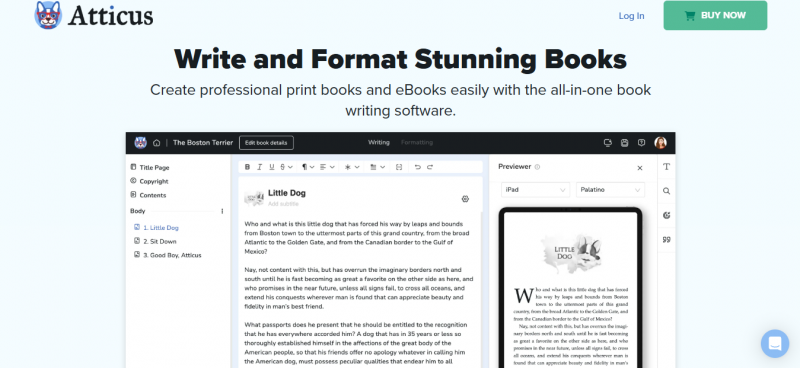
Atticus, made by Dave Chesson of Kindlepreneur and launched in 2021, was built to fill a specific gap: a cross-platform tool that both drafts and formats a book without switching apps. It runs in the browser and as a desktop app on Windows, Mac, Linux and Chromebook, which is its biggest advantage over the Mac-only Vellum, and it is a one-time purchase with future updates included.
Formatting is where it earns its place. You arrange front and back matter, let it generate a table of contents from your chapter structure, and pick a genre chapter theme, with control over drop caps, ornamental breaks and full-bleed images, none of it requiring code. Exports include print-ready PDF, EPUB and DOCX, ready to upload to KDP, IngramSpark and other stores, and a pre-export check flags common issues before they cause a rejection. It can even generate large-print editions from the same manuscript.
It is a formatter first, not an AI writer, so it sits at the end of the pipeline after your drafting tool. Authors report occasional rough edges, from slow PDF exports to sync hiccups and the odd rejected EPUB, so disciplined backups help. For anyone who formats more than one book, the one-time price amortizes to very little per title.
| Type | Writing and formatting | Access | Browser plus Windows, Mac, Linux, Chromebook |
| Pricing | $147 one-time, future updates included | Exports | Print-ready PDF, EPUB and DOCX |
| Best at | Turning a manuscript into publishable files | Limit | Not an AI writer, and some users report export bugs |
End-to-end generators - Idea to ebook
End-to-end generators are a different category: instead of helping you write, they aim to produce the whole book. Tools like Inkfluence AI, Chapter and Automateed take a description and a genre choice, generate a structured outline, then write each chapter in sequence against a running story bible so names and facts hold together, and finish by designing a cover and exporting the file.
Inkfluence AI is a representative example. It offers more than twenty genre blueprints, from nonfiction guide and workbook to novel and cookbook, generates chapters, keeps a story bible, designs covers, exports EPUB and PDF, and can produce audiobook narration to ACX specifications. Its free plan gives five chapters plus five more each month, the Creator plan is around ten dollars a month for thirty-five chapters, and Premium is around twenty dollars a month for unlimited. Chapter markets complete, publication-ready novels, and Automateed focuses on generating a full structured draft.
The trade is control over the prose. You gain a finished, uploadable file in a fraction of the seven to sixteen hours a manual chatbot workflow takes, and you give up the fine command over voice that a craft tool provides. That makes these platforms a natural fit for nonfiction and how-to ebooks, and a looser fit for literary fiction, where most authors still want to shape the sentences themselves.
| Type | End-to-end generator | Access | Web |
| Pricing | Free plan, then about $10 to $20 per month | Exports | EPUB and PDF, some with audiobook |
| Best at | Getting from idea to a finished ebook fast | Limit | Less control over the prose |
The comparison at a glance
Approximate 2026 figures that change often. Watch the pricing model, since one-time, subscription and bring-your-own-AI plans are not comparable at a glance.
| Tool | Type | Platform | Pricing | Publishing export |
|---|---|---|---|---|
| Claude | General AI writer | Web, desktop, mobile | Free, or ~$20/mo | None |
| ChatGPT | General AI writer | Web, desktop, mobile | Free, or ~$20/mo | None |
| Sudowrite | Fiction craft tool | Web | ~$10 to $44/mo, credits | None |
| Novelcrafter | Fiction craft tool | Web | $4 to $20/mo plus AI | Manuscript only |
| Scrivener | Organization | Mac, Windows, iOS | ~$60 one-time | EPUB, PDF, DOCX and more |
| Atticus | Formatting | Browser, Win, Mac, Linux | $147 one-time | Print PDF, EPUB, DOCX |
| Inkfluence AI | End-to-end generator | Web | Free, then ~$10 to $20/mo | EPUB, PDF |
The cost reality behind the sticker price
The advertised number is often the smaller one. Three pricing models decide what you actually pay.
- Bring-your-own-key. Novelcrafter and similar tools charge a low subscription, then have you connect your own AI provider and pay per token for what you generate. A novelist drafting a chapter a day on a frontier model commonly adds twenty to sixty dollars a month in API fees, so the subscription alone understates the real cost
- Credits. Sudowrite bundles the AI into its price as credits, which is more predictable, but premium models burn credits far faster than budget ones, so the tier you need depends on which model you write with, not only how much you write. Unused credits roll over for twelve months
- One-time. Scrivener and Atticus cost more up front and far less over years, since you own them outright with no renewal. For anyone who keeps writing, that math usually wins
Answer three questions
- What are you writing?
Fiction where prose and continuity matter points to Sudowrite or Novelcrafter for drafting and Claude for editing. A nonfiction guide or how-to points to ChatGPT or Claude for the writing, or an end-to-end generator whose blueprints handle the structure for you.
- Where do you actually get stuck?
If you never finish a first draft, an end-to-end generator removes the wall. If you finish but drown in the organization of a long project, Scrivener is the answer. If formatting is what stops you shipping, Atticus solves it in one app.
- What is your budget?
Zero budget means the free stack, a general chatbot plus Reedsy Studio. A preference to own your tools favors Scrivener and Atticus. A wish for one predictable bill favors Sudowrite, while the cheapest flexible AI comes from Novelcrafter with your own key.
The final verdict
No single winner, because a book is four jobs. Here is the shortest honest answer for each situation.
Best for most authors: Claude to edit plus Atticus to format, added to whatever drafting tool fits your genre. It covers the two stages AI and formatters do best and leaves the prose to you.
Best for fiction craft: Sudowrite for prose, or Novelcrafter when worldbuilding and continuity are the priority.
Best for a finished ebook fast: An end-to-end generator such as Inkfluence AI, which takes you from outline to EPUB in one place.
Best for formatting: Atticus, one payment, cross-platform, print and ebook files from a single manuscript.
Best on a budget: ChatGPT’s free tier with Reedsy Studio, which is enough to draft and format a real book for nothing.
The authors who finish do not buy the most powerful app, they assemble a small, deliberate stack: something to plan, something to draft, Claude to edit and Atticus to format. Pick the stack that matches your genre and the step that stops you, prove it on one chapter, and start writing. The tool was never the hard part.
Post Comment
Share your thoughts about this article.
Be the first to post a comment!